

Projects, chapters, Story Memory, plans, annotations, and indexes are owned by the Mac workspace, not a cloud manuscript host.
Fiction writing app for Mac.
Start a novel without losing the thread. WolfeWriter keeps your manuscript, chapter plans, characters, and continuity together in one native Mac workspace, then lets you decide which AI suggestions belong in the book.
Free to start on the Mac App Store Write, plan, and keep your project local; Pro intelligence is available for your first 7,500 words Requires macOS 26 or later on an Apple silicon Mac.
A writing room, not a chat box.
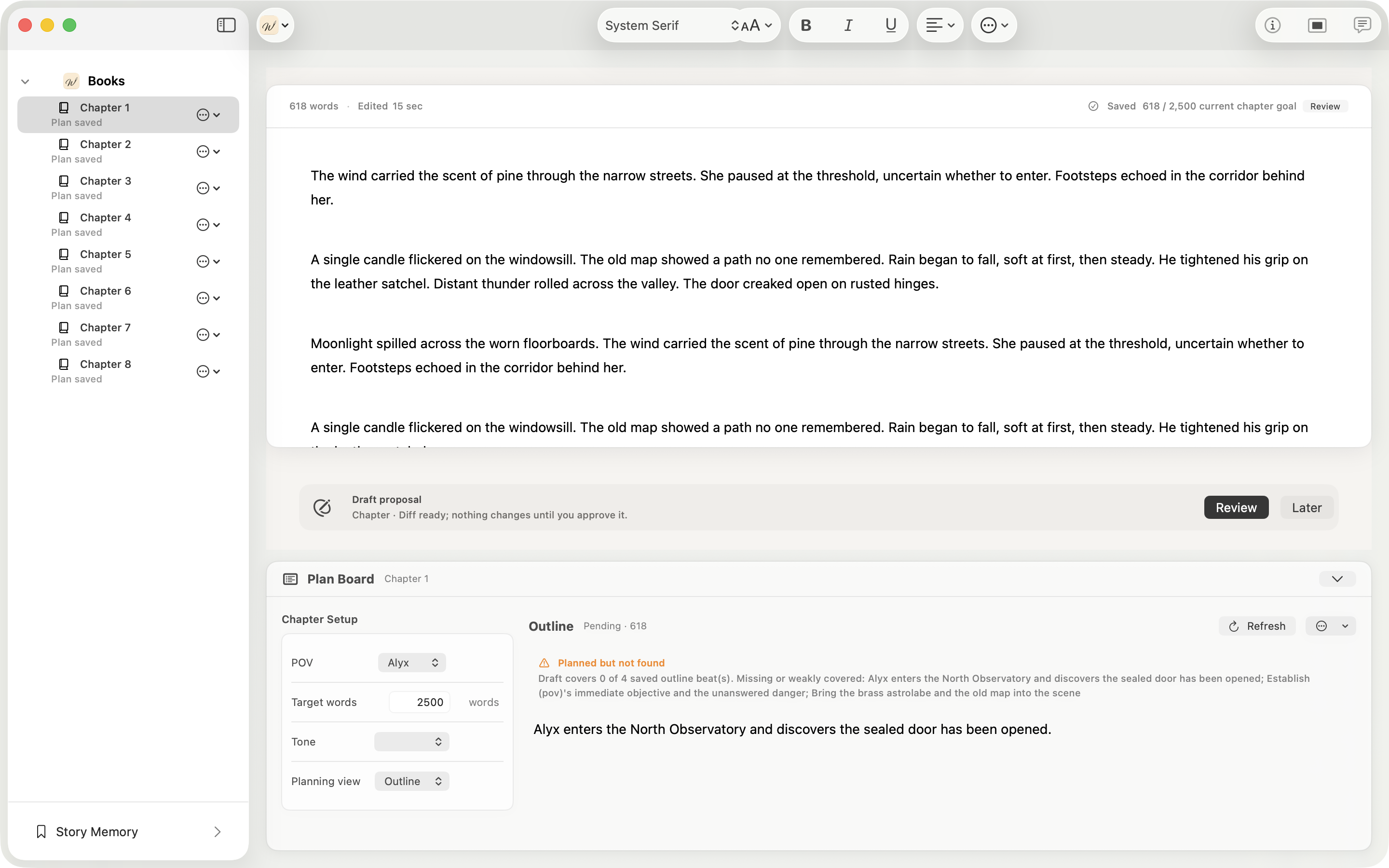
WolfeWriter keeps chapters, scenes, notes, and writing help around the manuscript instead of pushing the draft behind a prompt window.
- ✓Native Mac editing with the manuscript as the primary surface.
- ✓Project structure stays close to the passage you are writing.
- ✓Writing assistance starts from book context, not a blank prompt.
Character Mara hides fear behind precise questions.
Rule The city never names the river after sunset.
Thread The missing bell appears before every false confession.
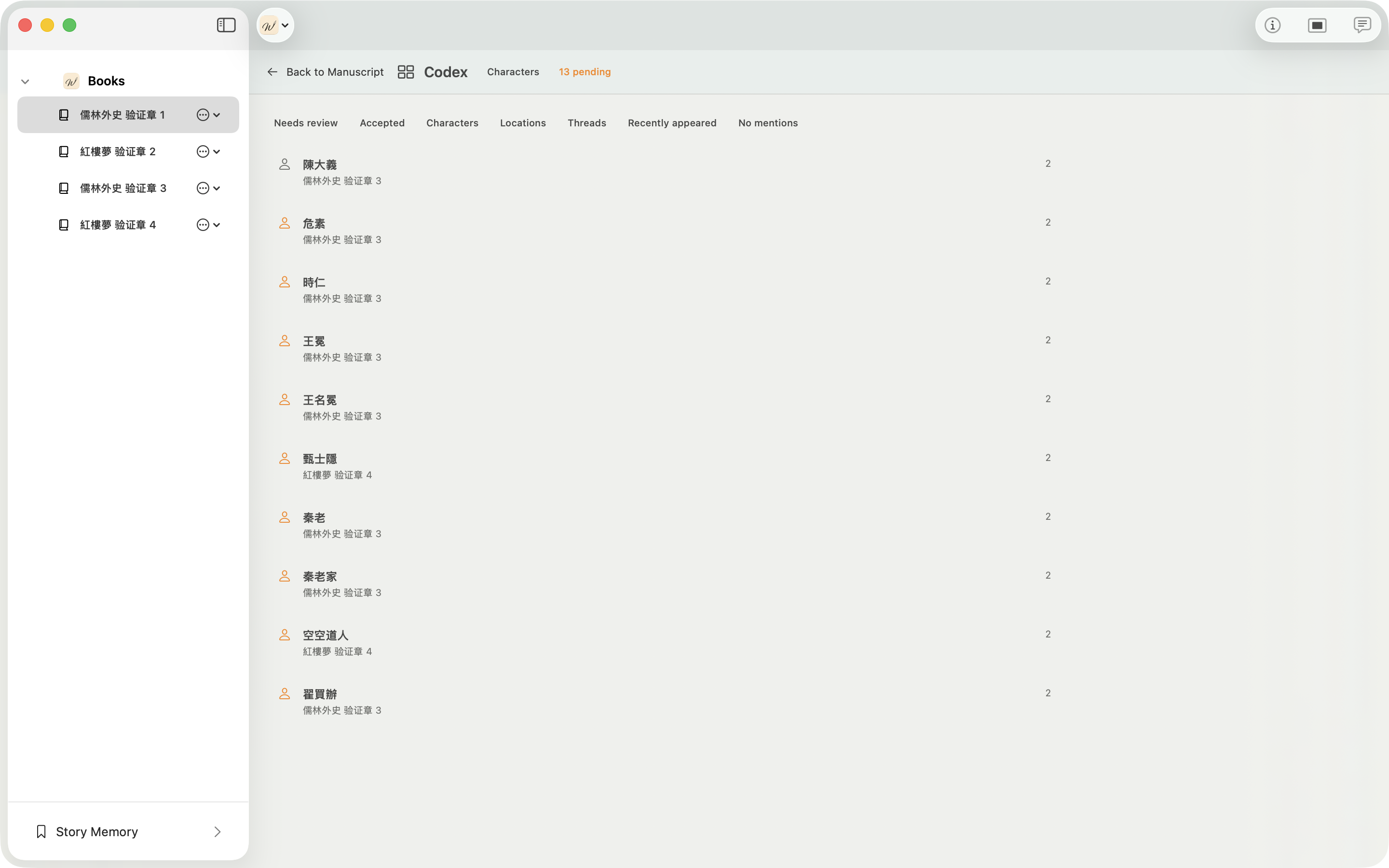
Story Memory that feels like part of the book.
Characters, places, rules, timeline events, and open threads become usable writing context. WolfeWriter keeps that memory visible and local.
Review before anything becomes canon.
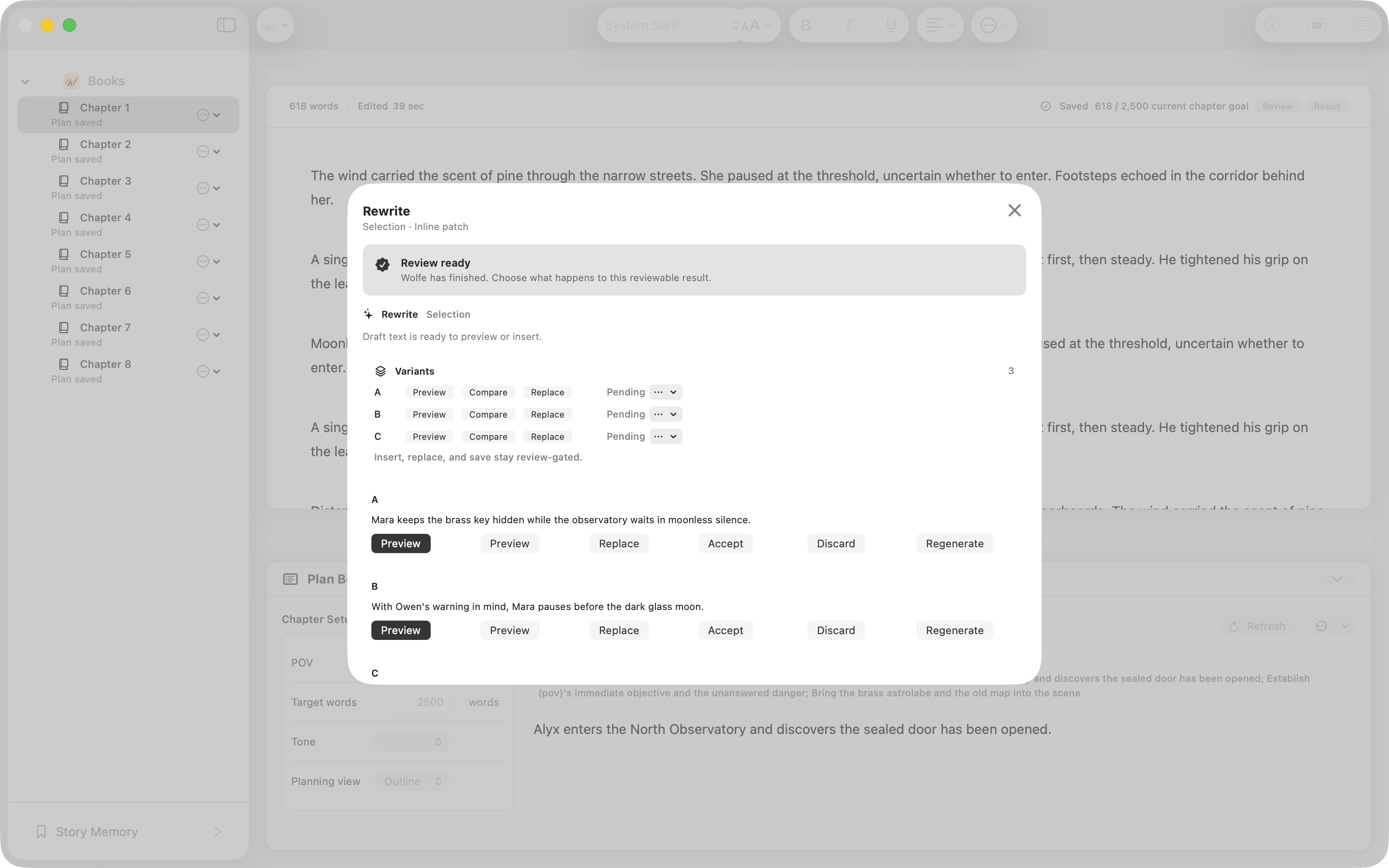
AI can help draft, rewrite, critique, and check continuity. The important part is where the change stops: at a proposal surface you can accept or reject.
- ✓Generated text is not manuscript text until accepted.
- ✓Memory and canon changes stay explicit instead of silent.
- ✓The writer remains the final editor of the book.
Plan the next scene from the book you have.
Book guide, plan board, chapter state, tone, threads, and constraints sit beside the draft so the next writing decision starts from the current story.
For the long project
Questions writers keep asking.
Practical answers for starting, structuring, revising, and getting useful feedback on a long-form fiction project.
How do I turn an idea into actual scenes and chapters?
Start with the book you have in mind, not a blank chat. WolfeWriter lets you create a book from an idea, then keep chapters, scenes, plans, and story context beside the manuscript as the idea becomes pages.
Should I outline the whole novel before writing it?
That depends on how you work. WolfeWriter supports both planned and discovery writing: use the Book Guide and Plan Board when you want structure, or begin in the manuscript and add planning context as the story develops.
How do I stop worldbuilding from replacing the actual story?
Keep world rules and background close to the scenes where they matter. WolfeWriter gives you local Story Memory and chapter-level planning so setting details can support the current scene instead of becoming a separate database you never use.
How do I keep writing consistently and finish a long project?
A writing workspace cannot supply discipline, but it can reduce the cost of returning to a project. WolfeWriter keeps your chapters, current plan, story state, and open threads together so you can resume from the book rather than reconstructing context from scattered notes.
What does ‘show, don’t tell’ mean in a novel?
It is a revision question, not a rule for every sentence. WolfeWriter can help you critique a passage and propose alternatives, while the manuscript remains unchanged until you review and accept a proposal.
How do I keep a character consistent while letting them change?
Track established traits, relationships, goals, and changes separately from the prose. WolfeWriter’s Story Memory and chapter planning keep those facts visible while you revise a character across the book.
How do I find plot holes and continuity errors in a long manuscript?
Continuity depends on people, places, objects, events, and what each character knows at a given point. WolfeWriter keeps Story Memory, chapter context, and continuity checks close to the manuscript so you can investigate issues before changing canon.
How do I tell whether a chapter is too slow or simply needs more setup?
Review the chapter’s purpose, beats, conflict, and open threads together. WolfeWriter’s Plan Board keeps those planning fields beside the chapter so you can decide whether a scene is earning its place instead of editing by word count alone.
How can I make dialogue sound different for each character?
Give writing help the current scene and book context, then review proposed dialogue against each character’s goals, relationships, and voice. WolfeWriter treats generated dialogue as a proposal, not an automatic replacement.
How do I manage multiple points of view without confusing the reader?
Record the point of view and scene purpose at the chapter or scene level, then keep the manuscript and plan together while revising. WolfeWriter’s Plan Board includes POV and other scene context fields for that workflow.
How do I include background information without an information dump?
Treat background as story context that should arrive when the scene needs it. WolfeWriter keeps world rules, terminology, and timeline events in Story Memory so you can recall them without pasting a large reference document into a chat.
How do I know whether a scene is necessary or should be cut?
Ask what the scene changes: a character, relationship, piece of knowledge, conflict, or open thread. WolfeWriter’s chapter and scene planning fields help you make that purpose explicit before you cut, rewrite, or keep the scene.
What should I revise first after finishing a first draft?
Start with structure, character movement, and continuity before polishing every sentence. WolfeWriter lets you work from chapter plans, Story Memory, and continuity review before accepting line-level writing suggestions.
When should I ask beta readers to read my manuscript?
Beta readers are usually most useful when you have a coherent draft and want a reader’s experience of pacing, character, clarity, and plot. WolfeWriter keeps the author’s working project local while you export the manuscript or chapter you want reviewed.
How do I find beta readers who will give useful feedback?
Look for readers who understand your genre and ask focused questions about the reader experience. WolfeWriter helps you prepare a clear chapter and story context, but the quality of feedback still depends on the reader and the questions you give them.
What is the difference between a beta reader, critique partner, and editor?
A beta reader reports what the story felt like to read. A critique partner helps examine the work in progress. An editor diagnoses craft and structural problems. WolfeWriter supports the manuscript and review process; it does not pretend those roles are interchangeable.
What is the safest way to send a manuscript to a beta reader?
Export only the chapter or manuscript you intend to share, and keep your working project separate. WolfeWriter supports Markdown and plain-text manuscript import and export, while the local library keeps the author’s project and Story Memory on the Mac.
How do I handle beta-reader feedback that contradicts itself?
Treat feedback as evidence about reader experience, not as an automatic instruction. Compare comments against your intended audience and your book’s canon, then record the decision you make. WolfeWriter keeps canon and memory changes explicit.
Can WolfeWriter replace Word, Google Docs, or Scrivener?
WolfeWriter is a native Mac fiction-writing workspace rather than a general document editor or cloud collaboration service. It focuses on manuscript-first writing, Story Memory, planning, continuity, and reviewable writing help. You can import Markdown or plain text and export chapters when needed.
Is WolfeWriter an AI novel generator?
No. WolfeWriter is built around the manuscript and the writer’s decisions. AI can help draft, rewrite, critique, brainstorm, and check continuity, but generated manuscript text and Story Memory changes remain proposals until you accept them.
Credentials belong in macOS Keychain. WolfeWriter keeps provider setup separate from manuscript and project files.
Generated manuscript changes stay proposals until accepted. Canon and memory changes stay visible, auditable, and reversible.
From the Journal
Notes from inside the writing room.
Essays about long fiction, local-first software, and the awkward decisions behind building WolfeWriter.
Read the journalStart your first book free on Mac.
Write, plan, and keep the project local for free. Pro intelligence is available for your first 7,500 words, so you can test the book-aware workflow before deciding.
Free to start on the Mac App Store Write, plan, and keep your project local; Pro intelligence is available for your first 7,500 words Requires macOS 26 or later on an Apple silicon Mac.